Welcome Enjoy Tutorials

Liked us?

Showing posts with label Feedburner. Show all posts

Tuesday, May 7, 2013

The Five key Elements that can not miss in your blog

For a moment let's get instead of those who visit our blog. What elements need to quickly find the blog? What do we offer?
This post also aims to serve as a guide so you can improve each section, begin!
share elements
Share Items to share the content of the post
If your post is interesting, the reader will want to share with your followers on social networks. You can not miss buttons Tweet, Like and Google +. Other options that you might like to analyze are Addthis or Sharedthis


elements of blogsElements to access information related
At the end of the post should provide related content, to ensure that whoever you choose to continue reading visit and in the best cases continue sharing. For example, tag your post, offers other related post thumbnails or links to other articles with the same label, post links with other words and / or your blog gives a table of contents.


elements to follow on blogElements to follow
If someone decides to share the content of your blog, you may want to follow in order to be aware of other publications. You can offer eg email follow through twitter (follow), through Facebook (fans) through Google + or via RSS (have a gadget for it or via FeedBurner).


elements of blogElements to facilitate direct communication
It is possible that your reader wants to express an opinion post through comments, want you to receive a private message through a contact form or ask a question directly via live chat.


blog contentPromotion of content elements
Think follower today who do not be aware of the post created last week, therefore promoted through social media content of your blog that is still valid. View article on Community Manager. Remember that you can automate your blog posts on Facebook, Twitter and Linkedin with TwitterFeed

As always, I invite you to use comments to leave your opinion on this article. If you liked this post and want to be anywhere else, follow me via Facebook, Twitter, subscribe by email, Google Friend, RSS now also on Google +. Use social buttons at the bottom of the post to recommend it to your friends. Grace

Sunday, April 28, 2013

One Tip Solution To Solve Google Sitemap Feed Proxy Errors

Most or all know how to submit your blog sitemap to Google if not you can Google for it and can find a lot of tutorials on this single topic but something that most of you might have observed are the Google Sitemap Errors! How do you solve them? Why so many errors when you have done everything the right way? The answer is simple , read on.
What actually happens is the fact that most bloggers burn their feeds at feedburner despite the default Atom feed system provided by Blogger. So most bloggers have redirected their default feeds to feedburner as shown below,

redirecting-site-feed
When we submit our RSS or Atom feeds at Google Webmaster Tools Site we are actually submitting the redirected feed hosted by feedburner. The disadvantage of doing so is that when Google Robot crawls your blog it basically indexes the data provided by the default BlogSpot feed system but since you have redirected your default feeds to feedburner, Google robot has to contact two feed systems at a time! first from BlogSpot and then from Feedbuner and thus it turns out into a confusion and results as Feed Proxy Errors which is surely a headache for every newbie blogger. Unfortunately the internet has almost rare tutorials on this issue. The reason behind doing a professional SEO course was indeed learning how to solve all such problems. Luckily I have come up with a solution.
The mistake everyone makes is by adding the following sitemap data,
http://YOURBLOGNAME.blogspot.com/rss.xml
OR
http://YOURBLOGNAME.blogspot.com/atom.xml
But this results in dozens of feed proxy errors. To solve this issue simply submit the following sitemap data,
http://YOURBLOGNAME.blogspot.com/feeds/posts/default?redirect=false
Note:- You only need to add feeds/posts/default?redirect=false  because your blog URL will be added by default.
where , feeds/posts/default?redirect=false is the code that redirects Google only to the default BlogSpot Atom Feed system.
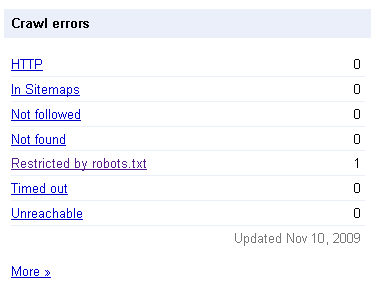
Finally the results for your blog will look like that for mine,
crawl errors
fully-indexed
Impressive isn’t it! Adopt the right method and you will see a positive change too. Search Engine do really count for 75% of the traffic to your blog so make sure you smoothen the path for them by optimizing your sitemap as guided in today’s post.
Enhanced by Zemanta

Monday, April 1, 2013

The key elements that can not miss in your blog

For a moment, let's put ourselves in place of those who visit our blog. What elements need to find quickly in the blog? What do we offer?


This post also aims to serve as a guide so that you can improve each section, begin!

Share Elements for post content sharing
If your post is interesting, the reader will want to share with your followers on social networks. A must buttons Tweet, Like and Google +. Other options that you might like to analyze are Addthis or Sharedthis

Elements to access information related
At the end of the post should provide related content, to ensure that whoever you choose to continue reading visit and in the best cases continue sharing. For example, tag your post, provides other related post thumbnails or links to other articles with the same label, post links with other words and / or your blog gives a table of contents.

Elements to follow
If someone decides to share the content of your blog, you may want to follow in order to be aware of other publications. You can offer for example, follow by email, via twitter (follow), through Facebook (fans), using Google + or via RSS (have a gadget for it or via FeedBurner).

Elements to facilitate direct communication
You may post your reader wants to express an opinion through comments, want you to receive a private message through a contact form or ask a question directly via live chat.

Promotion elements contained
Think follower today who do not be aware of the post created last week therefore promoted through social media content on your blog that is still valid. View article on Community Manager. Remember that you can automate your blog posts on Facebook, Twitter and Linkedin with TwitterFeed
Enhanced by Zemanta

Saturday, March 30, 2013

Fixing The Feedburner Subscriptions by Email Error

 Feedburner issue when you go to subscribe via email to your feeds the following error appears,
feedburner error
First of all you need to signup to Feedburner and burn your feed.
Once you have done that click on the Publicize tab,
publicize
                                                      Then click on Email Subscriptions,
email subscriptions
                                   Copy the generated code and paste it into a text editor,
copy code
 My WordPress theme has an RSS email subscription component in the footer (yours may be different),
email rss
                                         Go to Appearance > Editor in WordPress,
editor
As my RSS email subscription component is in the footer, I need to edit footer.php (yours may be different),
footer.php
Next, I found the following piece of code in my footer.php file,

-------------------------------------------------------------------------------------------------------------------------
onsubmit=”window.open(‘http://feedburner.google.com/fb/a/mailverify?uri=<?php echo get_option(‘feedmail’); ?>’, ‘popupwindow’, ‘scrollbars=yes,width=550,height=520′);return true”>
--------------------------------------------------------------------------------------------------------------------------.


              Then went to my Feedburner code and copied the following,
----------------------------------------------------------------------------------------------------------------------------
onsubmit=”window.open(‘http://feedburner.google.com/fb/a/mailverify?uri=thesocialmediaguide’, ‘popupwindow’, ‘scrollbars=yes,width=550,height=520′);return true”>
----------------------------------------------------------------------------------------------------------------------------.

Then copied this Feedburner code and pasted it over the code in the footer.php file.

.
So that it the first bit of copying and pasting out of the way.. one more to go..
.
                 Then found the following piece of code in my footer.php file,

<input type=”hidden” value=”<?php echo get_option(‘feedmail’); ?>” name=”uri”/><input type=”hidden” name=”loc” value=”en_US”/>
.
                   Then went to my Feedburner code and copied the following,
<input type=”hidden” value=”thesocialmediaguide” name=”uri”/><input type=”hidden” name=”loc” value=”en_US”/>
.

I then copied this Feedburner code and pasted it over the code in the footer.php file.

.
Click on <Update file> to save the changes.
Go back to your site to test everything works.
Enter your email address to subscribe,
emailAddress
Enter your email address,
request
                                                      The following should display,
check email
                After click on the confirmation link in your email address, then following will appear,
confirmed
Ready!

Enhanced by Zemanta

Botones Isometricos de Social Media


Barra Lateral Fija