Welcome Enjoy Tutorials

Liked us?

Showing posts with label Google Analytics. Show all posts

Tuesday, April 30, 2013

Google Analytics For Statistics Blog

Google Analytics is a free service of Google analytics specialist websites using automatic data collection from visitors. Will be able to inform us about the number of visits, average time of the same, the pages viewed, unique visitors, visitor loyalty, location of users and so on.

What is the purpose of this tutorial?
If you've never used Google Analytics, the goal is to register an account and then ownership of your website / Blog. If you wore it before, you just need to add a new property. In both cases, we have to integrate a tracking code on the blog, which will collect all the information necessary to produce the statistics.

Do I really need if I just start the blog?

It is highly recommended, it is a necessity, even if your blog takes only a few days and visits published is not what you care about is more important for the future leave this task done from the beginning. Of course if your blog takes more time is urgent and you have the necessary configuration.
Tutorial. Steps to register your blog on Google Analytics
Step 1 and 2 of the tutorial is conditional on whether or not you were already user of Google Analytics.
1. Case 1. I am new, I never used Google Analytics
google analysis dashboard

    Access to Google Analytics
    Then it will show a wizard.
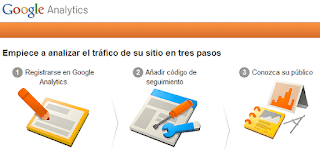
The first step is to register your account see image in step 1. After filling the data, press the Create Account button and continue at step 3 of this tutorial.

Two. Case 2. I already had an account set up in Google Analytics

    Access to Google Analytics
    Upon entering, select your account
    Click add new property. See display this step. Click the Create button property to subsequently obtain the tracking code.

Three. Get the tracking code (common for both cases)

    On the tracking code. Copy the code by right-clicking or Ctrl C provided on this page and go to siquiente step.

April. Paste the tracking code on the Blog

    Access Blogger
    Click Template tab
    Make a backup by clicking the "Create Backup / Restore"
    Click the Edit HTML button
    Click the Continue button
    Press the key combination Ctrl F or Ctrl B (Mac ⌘ ⌘ F or B) and looking
    Tracking code paste previously obtained just above the line found
    Save, view your blog, you should not be anything unusual

Once these steps, wait 24 hours and returns to access Google Analytics in order to verify that you are data on visits to your blog.

Enhanced by Zemanta

Analysis and advice On Blogger Comments on Google+

English: Google+ wordmark
English: Google+ wordmark (Photo credit: Wikipedia)
 In this publication we will make an analysis of this change, the impact of which is from the point of view of the administration of the blog, for the impact it has for readers and also the scope of this novelty.


Blogger and Google+, Google+ and Blogger does not matter the order, the fact is that Google+ is Google's bid to compete to enter fully into the world of social networks and where they go most of new company developments . Sooner or later different service and products are integrated with Google+ iran.

Blogger is because it represents one of the most Google services integration with new social network has experienced in the last year, but not the only, the search engine, Gmail, YouTube, Google Analytics, webmaster tools , etc, etc.., have been in some way or another affected in favor of greater integration with Google+.
Enhanced by Zemanta

Sunday, March 31, 2013

How do I exclude my visits statistics blog or website?

Hard Numbers of Success - Flickr Traffic Stati...
Hard Numbers of Success - Flickr Traffic Statistics Chart (Photo credit: epSos.de)
Imagine the case of a small company where all employees have the corporate website homepage, or for example when you manage a blog, you're usually much time online. In the first case, affect the number of visits and bounce rate (sales of the same web page you enter) and the second affects the average time statistics ...

If you will not deceive yourself, and I know that at first seems that nobody is connected and that your own visits motivate you, you should exclude traffic statistics generate yourself to visit the blog or website.

For this there is a concept called Google Analytics Filter. One of its applications is this precisely to exclude you from visiting a particular location or IP ... but it can also be used for individual statistical values ​​such Otherwise, how many times my employees review the corporate website.

In the case before us, we will have a filter to exclude visits from an IP address. Find out first what your public ip from this link (you must be navigating from your computer or place to exclude). Once annotated public IP, perform these simple step:

Steps to exclude my visits statistics:
Step 1. Log in to Google Analytics
Step 2. In the bottom right, where it says filters, click "Filter Manager"
Step 3. Now in the Filter Manager click + Add Filter (on the right)
Step 4. Indicates filter a name such as "Exclude visits my house" "Exclude views of the company"
Step 5. Click on "Custom Filter"
Step 6. Click on "Exclude"
Step 7. In the dropdown "Filter Field" selected visitor's IP address
Step 8. In "filter pattern" should indicate the IP averiguastes before. If the IP is 192.168.1.1 eg the field value should be: ^ 192 \ .168 \ .1 \ .1 $ (ie place a \ before each point of the direction and the two symbols to comiento ^ and $ at the end).
Step 9. At the bottom you have the profiles (statistics) to which you want to filter. Select the profile and click the "Add" finally click "Save Changes"

You can make as many filters as you want. If you work on a blog and collaborates else is also advisable to make a filter from the partner's IP, just to tell you your IP and manage a new filter.

Post. Most of us have dynamic IP that means that every time you turn off the router (which I do not) and turn it on again the public IP changes. Remember, you may be creating as many filters as you want. Another thing is that you can create an IP range, which is somewhat complicated because more users will be excluded.

The solution is that Google offers Filter by Cookies that you value and while it may be applied to a Web not think you can apply to the blog (see the first of the related links).

Remember that if you apply the filter now have to wait until tomorrow to see its effects.

I hope you can apply it without problems.

Leave your suggestions and experiences so you can help with this post. Thanks
Enhanced by Zemanta

What to choose for your blog platform Blogger or Wordpress?


English: WordPress Logo
English: WordPress Logo (Photo credit: Wikipedia)
Maybe you've got here just looking at Google. This should make you think about the potential of a blog is that now, more than ever, the contents play a very important note that is what will differentiate you from the competition.

As you probably know, there are basically two important and recommended platforms for your blog,  Wordpress and Google's Blogger.This is a blog created with the Blogger platform. I do not intend to make a comparison with Wordpress but Blogger expose the benefits of that is the tool I use. To complete your study try to put links to recommended reading comparisons between the two platforms.

Then answer the questions you have in your head :-)
This is icon for social networking website. Th...
This is icon for social networking website. This is part of Open Icon Library's webpage icon package. (Photo credit: Wikipedia)


Why do I need a blog?

    To have your own space from which to communicate on the Internet


What topics I can write on the blog?

    Personal issues, experiences, travel ...
    Corporate, product news, offers ...
    Specialized topics, programming, design, cooking ...


What is the attitude I should have?

    Be consistent in the literature
    Transmit a direct and clear
    To think that each publication should be better than all previous
    Being supportive and think that convey your knowledge can help others if anything in return
    Involved with the comments and followers of your blog


Can you make money with a blog?

    If you open a blog with ideas to make money better than not even try
    You can make money with a blog, but very long term (2-3 years)
    Money should not be the trigger that drives you to create a blog


What are the best platforms for hosting a blog?

    Blogger
    Wordpress


What does it cost to create and maintain a blog?

    The blogging Blogger is free both as in the online version of Wordpress ("In some cases we can announce Google text ads on your blog, but only very rarely" features extracted from Wordpress)
    WordPress is an installable version which is what most people use. To run this version you must have a hosting service where host and your blog thereby incur an extra expense.
    Many hosting providers make it easy WordPress installation but better have a friend with knowledge about you. In certain situations this "friend" can mean an additional cost (calls, emails, weather, etc).
    Wordpress Security Updates. If you go for the installable version of Wordpress keep in mind that you must keep your updated version and this maintenance can also add costs.
    Blogger does not have an installed version, the service is hosted on Google's servers and not have to worry about the hosting and maintenance, always use the latest version of the product


What do you expect from this blog platform?


    Make it easier to post
    Make it easy to manage
    That service constantly improve and evolve
    Which is stable


The ten reasons why I recommend Blogger

    Because it requires having to install or download anything. Everything from the browser
    Because it requires no technical knowledge of html, css, javascript. This causes you to focus exclusively on publications
    Because behind Google's Blogger
    Because the hosting is free to both the domain. Blogspot.com as the custom domain.
    Because after the blog integrated other Google services like Google Analytics (Statistics), Google Adesense (advertising), Google Site (site creator and file storage space for the blog), Google Webmaster Tools (which allows the search index Also of Google), Google Picasa to store photos blog, Youtube for videos ...
    Because you can also post on the blog from a smartphone
    It incorporates a powerful template designer in addition to the thousands you can get for free
    Because you can get started without spending a single euro thanks to the free domain. Blogspot.com
    Because you can buy a domain at any time directly (12 dollars / year) and free domain redirect you to the new.
    Because there is a large community of users who use it


Have you looked at Blogger lately?
 
What do you need to create a blog?

     For an account of GMail Blogger
     Wordpress For Online any email account

At this point you should have clarified certain doubts, now you decide which platform is Blogger or WordPress (online version or downloadable version), it is clear that my experience is very positive and Blogger is my recommendation.

Now what?

     Start by making a tour through Blogger and decides at the last step if you are creating the blog
     Lee Wordpress features and decide at the end if you are creating the blog


Enhanced by Zemanta

Botones Isometricos de Social Media


Barra Lateral Fija