Welcome Enjoy Tutorials

Liked us?

Showing posts with label Blog. Show all posts

Friday, June 7, 2013

Nube Color Negro Para Etiquetas De Blogger


En este articulo te explicare cómo añadir un atractivo widget de etiquetas negra en forma de nube a blogger. Este widget de etiquetas es limpio y bonito, los visitantes pueden encontrar todas las categorías de tu blog fácilmente. Anade estilo y presencia a tu sitio.

Pasos para insertar este widget de etiquetas negras a tu blog.
 1. Entrar a la cuenta de blogger y Click desplegable.

2. A continuación, seleccione "Plantilla", como a continuación.


3. Ahora se puede ver en vivo en el blog, haga clic en el botón Editar HTML "

4. Ahora haga clic en el botón Continuar.
  
5. Encuentre esta etiqueta ]]> </ b: skin>  usando Ctrl + F 

6. Pegue el siguiente código antes de etiqueta ]]> </ b: skin>

/*-----Custom Labels widget by tricksblogspot.blogspot.com/----*/

#Label1 a{float:left;
height:18px;
line-height:18px;
position:relative;
font-size:12px;
margin-bottom: 9px;
margin-left:10px;
padding:5px;
background: rgb(69,72,77); /* Old browsers */
background: -moz-linear-gradient(top,  rgba(69,72,77,1) 0%, rgba(0,0,0,1) 100%); /* FF3.6+ */
background: -webkit-gradient(linear, left top, left bottom, color-stop(0%,rgba(69,72,77,1)), color-stop(100%,rgba(0,0,0,1))); /* Chrome,Safari4+ */
background: -webkit-linear-gradient(top,  rgba(69,72,77,1) 0%,rgba(0,0,0,1) 100%); /* Chrome10+,Safari5.1+ */
background: -o-linear-gradient(top,  rgba(69,72,77,1) 0%,rgba(0,0,0,1) 100%); /* Opera 11.10+ */
background: -ms-linear-gradient(top,  rgba(69,72,77,1) 0%,rgba(0,0,0,1) 100%); /* IE10+ */
background: linear-gradient(to bottom,  rgba(69,72,77,1) 0%,rgba(0,0,0,1) 100%); /* W3C */
filter: progid:DXImageTransform.Microsoft.gradient( startColorstr='#45484d', endColorstr='#000000',GradientType=0 ); /* IE6-9 */
color:#fff;
text-decoration:none;
-moz-border-radius:4px;
-webkit-border-radius:4px;
border-radius:4px;}
#Label1 a:hover{fbackground: rgb(73,192,240); /* Old browsers */
background: -moz-linear-gradient(top,  rgba(73,192,240,1) 0%, rgba(44,175,227,1) 100%); /* FF3.6+ */
background: -webkit-gradient(linear, left top, left bottom, color-stop(0%,rgba(73,192,240,1)), color-stop(100%,rgba(44,175,227,1))); /* Chrome,Safari4+ */
background: -webkit-linear-gradient(top,  rgba(73,192,240,1) 0%,rgba(44,175,227,1) 100%); /* Chrome10+,Safari5.1+ */
background: -o-linear-gradient(top,  rgba(73,192,240,1) 0%,rgba(44,175,227,1) 100%); /* Opera 11.10+ */
background: -ms-linear-gradient(top,  rgba(73,192,240,1) 0%,rgba(44,175,227,1) 100%); /* IE10+ */
background: linear-gradient(to bottom,  rgba(73,192,240,1) 0%,rgba(44,175,227,1) 100%); /* W3C */
filter: progid:DXImageTransform.Microsoft.gradient( startColorstr='#49c0f0', endColorstr='#2cafe3',GradientType=0 ); /* IE6-9 */}
.label-size{line-height:1.5;align:left;}
.h2head-text {margin:-40px 10px 8px 55px;color:#666666;font-family:arial;font-size:13px;}

#Label1{width:320px;;border-bottom-width: 1px;
border-bottom-style: solid;  
border-bottom-color: #D8D8D8;}

7. Ahora Haga clic en Guardar plantilla.

    Listo
Enhanced by Zemanta

Monday, May 6, 2013

Is it a bird? Is it a plane? ... No, it's ... Superpost!

Knowing who your Superpost has many advantages for achieving new goals in your blog. What is the most visited post of the blog?, Why a post gets more visits than others in Blogger?, Are questions that will clarify in this article.

When you take a reasonable time to your blog (6 months and up) is a good time to pull the statistics and know what post gets more hits, ie you know your Superpost. Keep in mind that a Superpost is the hardest working post on your blog, is one that attracts more visitors and therefore must pamper and care.
How to discover your Superpost?
Let's find out who your Superpost, for that follow these steps.

    Go to the tab Statistics
    Click the button at any time
    Now you have to display statistics from the beginning of the blog activity
    Y. .. presto! Your Superpost is .... the first in the list of Inputs section

Look as is the second, if you have similar figures is possible that you get a second Superpost, but if you see that the third is very close to the best we are facing a case of false Superpost so you should give more time to your blog , and recheck the same thing in another 6 months. To give you an idea, my Superpost has more than 24,000 visits a year and a half. The second order of visits reached 14,000 visits and 12,000 visits third. Therefore, the first is a clear example of Superpost.
I know who my Superpost what now?
Below is a list of 10 tips to help you make your Superpost.

    Back to reread, improves overall writing
    Say hello to your readers, you know that many come through Superpost!
    Will get invites readers to follow explicitly through social networks
    You can invite you to subscribe to your newsletter by eMail
    Invite him to discover new content on your blog with links to strategic
    Add a picture or enhances existing
    Add an update at the bottom
    Better formatted text in bold, titles, etc..
    Improving the keywords in the first paragraph, but beware as this first paragraph has been included in the rankings.
    Invites to share the input using the social buttons

Why a post is more visited than others?
The first thing that has happened is that you've hit the nail, ie words of the title, the url of the post and the first paragraph of that contains keywords that are in high demand and popular on the Internet. If you want to delve into this issue, look at this another Article 10 SEO Tips to position each Post in Blogger.


Enhanced by Zemanta

What is Buffer and how to combine it with Blogger


Buffer is a service that allows you to store the notifications you cast from your blog to your social channels (Twitter, Linkedin or Facebook) for publication following is a schedule. In this article I give the keys to combine it with Blogger.

 One of the tasks as bloggers have to consider, is to promote not only the new post, but the above, as long as they maintain in full force and interest. In my case, what I did was open my post and click the Twitter button. Of course, not knowing if it was the best time or the best time. Also I did not like suddenly Tweet 3 or 4 items. So finally it was all a bit random and not follow a specific pattern. For me it has been a great discovery and I encourage you to implement it in your daily make as a blogger.


What is the idea?
The idea is simple. We continue by clicking on the Twitter button as if we were to publish but instead of "Tweet", Buffer will press the button, so that is not published at the time, but following a schedule and based on previous stock you have on Tweets for launch from Buffer. Ideally, go fill your Buffer and make 1 full week.

If you have the Twitter button you can also send your post to Buffer using the right mouse button, or by a new icon that will display in your browser to read it.

What does BUFFER against direct notification to your followers?


As I said before, Buffer is as a collector of the notifications you want to convey to your followers on Twitter, Facebook or Linkedin. Instead of launching a direct notification, it is stored to be launched following a few hours a day. Of course not everything has to go through the buffer, you can continue to report to your followers, as has been done so far. Remember to sync your new publications with your social channels can use IFTTT (recommended) or TwitterFeed.

Keys to combine Buffer with Blogger
Buffer register and Configuration

    Sign in BufferApp, creating a new account or using Twitter, Facebook or Linkedin
    Connect with your different accounts Buffer
    Click where it says Settings at the top to access the calendar
    Choose your social channel and now you can configure which days of the week and what time throw your notifications. (See this screen)

Install Buffer extension for your web browser

    Browser extension for Google Chrome (recommended)
    FireFox browser extension (from the extras of Buffer)
    Sailed Extension for Opera

"Buffea" your first post using the Twitter button
Do the usual, ie see a post and click on your button Twitter. Just click it and watch you Buffer button appears next to the button for Twitter. To add to Buffer should indicate by what account (Twitter, Facebook or LinkedIn) you release it (may be three).

Now just send the Buffer tickets that you want to promote during the week, so that you have more time to new content, pending comments or simply respond sports, lol.

Install Buffer on your SMARTHPHONE
The mobile application allows you to share with Buffer any web address you're visiting. Plus you have access to your schedule can view the status of Buffer and statistics of each notification released. I have it installed and check the soil often.

    Buffer app for iPhone, iPad
    Buffer app for Android (Google Play)

How to know what time notify my followers?
This is the big question. What we want is that the impact of our notice have more effect. This is achieved notice in those times of the day where you have more active followers. For this statistics online services are able to provide this data. Furthermore, these services can automatically set Buffer schedule adjusting those hours more active followers.

    Timely
    Tweriod (very easy)
    SocialBro (Chrome extension)

Did you know BUFFER? Do you're using? Do you see it practical?
I would like to complete this article with your comment. Also if you consider it interesting to your friends and followers share used social buttons located at the foot of the article.


Enhanced by Zemanta

Unlearns to Blogging. 10 tips for you

blogger tips

There is nothing worse than not question things and keep doing them as long as mechanically. I propose this exercise, in which you stand to analyze the time, the state of your blog and the way you've done things so far. Ultimately we unlearn to relearn from scratch, for this we will touch 10 points I think are important.

10 tips where you unlearn blogging

1. Worry about the loading speed of your blog
The loading speed of your blog is crucial for positioning. A slow blog is a blog that will be positioned wrong, regardless of content. This may or I had raised (yet). I have returned to iniciaBlog somenter this test in order to improve this parameter. I removed items and I have questioned others, the result is important. One way to know how long it takes your blog is to use GTMetrix also invite you to read this post tips and resources verlocidad optimize your blog to find more resources. You are about to conclude that what was important to you and your blog will not be much when you see what it takes to load.

Two. Go over again the title, description and the slogan blog
Possibly wearing time without changing these sections. It's a good time to rethink your slogan, description of your blog and even the title. By now you have very well defined your blog concept. In my case I can assure you that these aspects have changed more than 5 times in two years. What are Metatags and what are the most important to Blogger is the post that will help in this regard. My latest achievement in this area is positioned at the top iniciaBlog looking for help Blogger. Remember that these issues are usually medium term impact and require monitoring. You are about to conclude how little you were successful with the title of your blog.

Three. Review the image of your blog, logo or profile picture
You've been dragging the same image from the beginning?, Do not you think it is high time to renew the look of your blog. If the image of your blog is based on a logo, simpre can improve it. I've renovated and have adjusted the slogan again. Not if you've thought or not but maybe the picture you want for your blog as your personal image (see this example). I know it's difficult to deal with professional tools like Photoshop, but perhaps reading Your blog needs a logo, you can discover some tools. The other thing you ask is quieria long are you going to keep writing on a napkin in your blog address to give to your friend? You'll reach the conclusion that it was not so complicated.

April. Review all social profiles to adjust the message and coherence
There is nothing more to it dislodges a follower who does not see the same image in profile between the different social networks where you have presence. Do not take for miss you all know you, take time to update all your social profiles, and you've changed your slogan, you've reinforced and now conveys a message much closer to reality, and therefore you have no choice . You will know what you have had to have suffered your followers.

May. It incorporates new tools to help you promote your post on social networks
Do you insist again and again in promoting mechanical manually and your post among your followers. Includes program service every Sunday BufferApp and what you want to communicate during the week. The 140 characters of Twitter go far, do not put just the post title and url, add hashtags, replacing the title with a question or other text related to the content of your post. What is Buffer and how to combine it with Blogger? You'll reach the conclusion that now spend your time on what really matters, create new content and respond to your followers.

June. Use your SMARTHPHONE for more than just playing apalabrados
I usually find many people who claim to SmartPhone. They are up to date with the latest news, rates of the different companies and up to operating system version. use four applications, as always apalabrados. If you have a SmartPhone or Tablet, you actually oriented operating system web services. You can monitor the status of your blog minute by minute, social networks and so on. I've questioned this and as a result here are 10 applications to manage your blog from your SMARTHPHONE. You'll reach the conclusion that you definitely have to uninstall an application accounts in favor of others.

July. Do not expect to find your blog, go ahead and answer your
With tools like Google Alerts you can receive a notification every time someone uses a number of words for your blog can be key. For example if you have a cooking blog or craft and in some forum someone asks how you make a blueberry pie? could be aware of and recommend your post. What say you on social networks like your competitors are evolving tasks of a Community Manager, This issue raises me a while and I'm constantly mulling over this issue, see this post What is a Community Manager and what tools used?. You'll conclude that your blog needs an administrator 2.0, so you have to put the batteries if you want to follow so improving.

August. Quantity or quality in your post, a titanic struggle
This is a very complicated issue and goes a bit depending on each type of blog, but I mention a little of what's on your mind me, in my case iniciaBlog contains over 80% post describing a method / tutorial. These tutorials are the key in this case the traffic I receive regarding organic searches. Which of them I know I can improve, and many services change and force me to update each post. It is a titanic struggle between continuing to create new content vs. maintaining and improving the current content. This will you put it only when you reach levels or when you think you've come full circle. I bet right now (always have) for quality, by improving existing, that's my priority rather than the creation of new content. Or put another way and nobody panic, for each new post that set, I would like to improve 3 above. You should be aware that there are short-lived post, those related to events (a peak in the statistics), subject to lifetime those stations (prolonged drop to zero in the statistics) eg product versions (iPhone3, iPhone4 , iPhone5 ...) and after long-term, ie one who manages to stay in time, such a simple recipe. Reflect on this topic if you see your blog post is made durable. Remember that we talked once about seo tips to optimize each post in Blogger where they touch layout issues. Before publishing this post, I improved this, this and this one too. You will conclude that you have done.

9. Check your outgoing links and analyzes whether or not it is worth keeping
You impulsively adding the links to your blogroll and it is longer than most of your post. Many of these links puende be pointing to blogs that are not updated, it does not exist or simply do not have a theme similar to yours. Make clean and consistent, the end result will be 10 times better than what you had before. Remember, oddly enough, a person can return to your blog for quality link that you offered in your blogroll, and says a lot about you the quality of the sites that you recommend to your readers. I've taken one and I have another. You will conclude that you are one of the few of your friends who are still active.


10. Do not neglect the blog and walk away and the Christmas ornament!
Now you can have a blog updated daily that if the foot of the blog that has to do with the year the copyright, etc. and outdated obsoloteo think is a bad image. Let alone those blogs that are showing Christmas decorations in February. If you are someone who are willing to surprise in every season, do it but do it well. You'll conclude that your approach was not the most successful and is too costly to maintain.


I'm not much given to this type of post, but I've played dumb positioning issues, marketing, socialmedia, productivity and user interface. Reflect and brings out the best for your blog, please unlearns to Blogging, consider things and jump to get them.
Enhanced by Zemanta

Thursday, May 2, 2013

How Place a Linkedin Buton In Each Post

LinkedIn
LinkedIn (Photo credit: Christopher S. Penn)
With this post I want to break the ice and initiate us into another social network, it is Linkedin. It is oriented to formalize a network professional and currently has over 135 million registered users in over 200 countries.
This new button will allow who we visit share the post with your professional network on Linkedin.

You probably already know this network, I from here I invite you to take a step further and appreciates the opportunity to create your own profile on Linkedin where you can enlist your resume, places I've worked and ultimately surround yourself with possible professional contacts to find new jobs and career opportunities.

Steps to place the button "Linkedin" on each blog

    Step 1. Access the HTML editor
        Go to "Template Tab"
        Make a backup copy of the template by clicking "Backup"
        Click on the "Format Template"
     
    Step 2. Find the following code in your template:
        Browser Use the form by pressing Ctrl F or Ctrl B (Mac ⌘ ⌘ F or B) and look for this text:
            .To place the button after the Post: post-footer-line post-footer-line-1
            .To place the button on the header of the post: post-header-line

    Step 3. Copy the following code Linkedin Button


    src='http://platform.linkedin.com/in.js' <script type='text/javascript'/>

    expr:data-url='data:post.canonicalUrl' data-counter='right' <script type='IN/Share'/>

    Step 4Paste the code just below the line found in Step 2.
    Step 5. Save the template and view the blog


For more information on this button and its variants refer to the official website Linkedin. In my case I chose the one with the counter clockwise. If you prefer to change the counter above the highlighted in red with the word top.

You may like me you take a surprise that some of your post already been shared on this network ... thanks!

We also recommend placing the button "Like Facebook" button "Google+" and button "Twitter"

Wednesday, May 1, 2013

How To Place A Chat On Blogger

A chat on the blog ... and for what. Imagine you have a toy store and also have a blog where public input on the characteristics of each item. You may receive messages such chattering stuffed animals do you get? Imagine now that you can chat with people who are watching the blog ...

There are many gadgets, widgets or plugins ... but personally, I remember one using at the time, and it worked. Plugoo is called, have a free version and you can chat from MSN Messenger, Google Talk (Gmail chat) and others.

This entry is a bit long ... are you ready?

We must be clear that there are two sections, first the chat embedded in the Blog or Web and other service we use to answer the questions. In this exercise we will use the Gmail chat.

Section 1. Embed the chat on the blog:
Step 1. Enter Plugoo
Step 2. Team Talk (or to create best in your case)
Step 3. Indicates username IM Gmail account might associate this service
Step 4. Fill in the registration
Step 5. Once inside the service, go to the tab "My widgets" and customize the chat object
Step 6. Copy the code below
Step 7. In my case I have HTML code is stuck on the same input, but it makes sense that this in the blog sidebar. This will always be visible.

Note that you can customize the appearance, width, height, text, colors, etc.. Also if Gmail account chatting serving is connected, it displays a green icon, otherwise red (closed the store to get something to eat). In these cases you can set it to act as a contact form, wonderful!.

Chat and running embedded in this blog post
Remember, if I'm not in the "toy store" you will see a red icon in the top left.


Section 2. Reply using Gmail account
To chat, you need to be connected to Gmail, login to your account active as long chat (chat link gets activated at the bottom of the messages received). On the left you have people to chat online with ... and see a new friend named MyPlugoo.
Enhanced by Zemanta

Bing's Webmaster Tools

Image representing Bing as depicted in CrunchBase
Image via CrunchBase
Like Google, Microsoft also has its own specific tools for webmaster. The truth is that almost a month after publishing the first post of ciudadblogger.info, indexing the same in Bing (Microsoft's search engine) is extremely poor, so try the tools proposed by Microsoft.

The first thing we do is to know the comparison of our site in the two search engines, it will use this tool bingle.nu which returns the search result in Bing and Google search engine simultaneously.

There are two ways to submit your site to Bing
. The first is to use this simple form, where you enter the corresponding url and ready.

The second and most recommended method is using the Microsoft Webmaster Tools

Step 1. - Access to tools for Microsoft
Step 2. - Click on the "Sign in to use webmaster tool" (identification)
Step 3. - You must use a Windows Live ID (Hotmail)
Step 4. - Once inside, add the site indicating the URL of your blog
Step 5. - You should check it, ideally using HTML code for the HEAD section of the Blog: To insert this verification code, do the following:

    Go to the Template tab and click on Edit HTML button
    Search using Ctrl F or Ctrl B this line in the code: <b:skin> <! [CDATA [/ *
    Paste the code snippet you should get Bing tools just before the line you found in the previous step
    Save the template

Now and track expected within a week.

In this post I have explained the procedure for the case of Bing. In subsequent posts, we will deepen more. The truth is, that both criteria idexación search engines are not the same, although Google seems to "reward" blogs, not so with Bing. On the other hand we see that Google indexes each page, while Bing only follow the main page while using the free domain gives you Blogger, ie. Blogspot.com
Enhanced by Zemanta

Tuesday, April 30, 2013

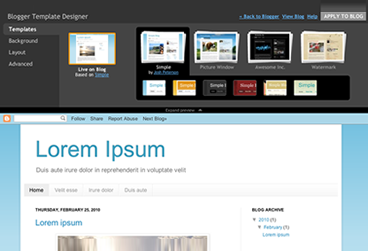
Blogger Template Designer

Time to talk about the overall design of your blog. At this point there are two ways, using the template designer blogger or incorporate a predesigned template ...

The truth is that before the appearance of the template designer blogger (March 2010) was practically mandatory search a predesigned template for blog, which would allow us to identify quickly.

First thing we do is to analyze the different elements that form part of the structure of our blog.

Blogger Template Designer     The General Fund blog. It can be a color or an image
     Header. It can be a text, an image or a combination of both. Remember that there is a Gadget to configure this section.
     Menu links or pages. Typically located after the header. Allows navigation through the blog and its pages. Remember you can create up to 10 pages for example to a web form, a guestbook, etc..
     The body. Formed by a zone where entries are posted and usually a vertical zone to the right of the entrance.
     The foot. It can consist of several blocks and will be positioned below the body of the blog

Then there are other elements such as typeface, etc.. All these aspects can be configured directly from the designer templates. With the added advantage that you can change on the fly any of these items, including the structure of the body (1 columa, 2 columns) foot or blog

For your reference, this blog has been improved using the blogger template designer. Everything you see, including the font were selected using this tool.

Here you have the video you used Google to announce this news (English)


Remember to start using the latest in Blogger before it is available to all users can access the administrator using http://blogger.com http://draft.blogger.com instead. Once you have accessed through draft will ask if you want to use as default desktop draft.

Obviously my recommendation is that you use the built-in template designer blogger (design tab). If after watching the video and try the tool does not stay convinced read on.

Free Templates for blogger:
The other alternative is to get a custom template based on the topic you are looking for then adapting tender. There are a variety of sites that offer free blogger templates. All these templates into account the different elements of the structure mentioned above.
Once you choose your template should incorporate through the Design tab and then Editor HTML. Press the Select Template button to load the XML file previously downloaded from any of the following sites:

Enhanced by Zemanta

Wednesday, April 3, 2013

What is a blog and what is for?

Image representing Blogger as depicted in Crun...
Image via CrunchBase
What is a Blog?
A blog is nothing more nor less than a diary. This diary can be personal or have a more commercial and corporate.

Every time you write something new you do it in a new page or what is called Post or input. , The most important is the content, quality and should be attractive both in substance and in form.

What things do I can write on the blog?

    On products, news, events and milestones of your store or business.
    About gardening, photography, sports, crafts, mechanics.
    On technology, travel, fashion, news, poetry, art, music, cinema.
    About family, children.

In each entry as part of the text, you can insert photos, videos and audio.

Which is more important the content or design of the blog?
Certainly both are important but should give priority to the content must be original content as I said before (no copies) and quality. You must be clear about what to write, who you're going to lead, shape and purpose of the blog. Finally you must be consistent and write if not every day in several a week. Actually the latter is the most important, how to write or who the wrath perfected over time. With regard to design what angers slowly improving but can not be the priority.

Google Blogger 
Now you need a manager for the blog, and that is when I introduce Google Blogger. This service (Blogger), you can create blogs, create and edit entries or post, customize the design of it, you can configure it to indicate whether such a blog is public or private to certain people ... The most important thing, so free and also over time your post will appear in the Google search engine.

Therefore we conclude that a blog is the most economical way to have an Internet presence, and is applicable to all whether you are an individual, entrepreneurial, independent or company. If you want to create a blog user community should be the focus of your strategy.

What do I need to create a blog?
Enthusiasm for what you are going to undertake and dedication to keep
A Gmail (Google Mail). If not, you can create it from here.

You do not need:
No need to know HTML or Web programming.
You do not need a hosting (hosting) and it gives you Google for free.
You do not need a domain, when you create your blog Google assigns you one free on the start. Example www.one.blogspot.com (later you can change by a. Com)

Steps to create the blog:
Connect with blogger and follow the wizard until you write your first post. When you publish, you have already created your blog and have a web address or url where invite your friends.

Of course I recommend you follow this blog because it is, how to start a blog and what aspects should be given slowly. All items listed on this blog are explained in subsequent entries. We will see interesting subjects like button "Like" on Facebook at each entrance or how to put social icons and even a music player.

Monday, April 1, 2013

How to take advantage of Google+ followers gadget in Blogger

But now you can add a gadget in Blogger which displays the profile picture and the number of people you have in your circles in Google+, and facilitates action follow through Google's social network.

In this article we will see how to add it to your blog, as well as a series of tips to make the most of.

 Notable Features
It is a visual element that will highlight your blog.
Clearly draw the attention of those who visit you. Below I outline some of the key features:

    Who visits your blog, you allow follow easily using the button Add to circles
    Shows profile pictures of some of those people with link to their respective profiles. This makes your reader that you know your community and add more people to your circles.
    Displays a counter of the number of people who follow you
    Facilitates who visits you access to all the people who follow you through the link at the bottom right
    Also available for those who use dynamic templates.
    Automatically adjusts to the width.
    The high is always a maximum of four rows of photos


How fans show your personal profile or fan page of your company / brand Google+?

This is a key feature that I believe important to note. This gadget is able to display information on your personal profile or business page on Google+. This depends on how you have linked your blog with Google+. To view it should go to the Google+ tab default and whether it is linked to your personal profile page or your brand. It is one of the main differences with LikeBox Facebook and the latter is "only" shows fans a brand page and personal profile.


The new Followers gadget, others retire earlier gadgets

Knowing that this gadget can display information on a Google+ profile, can question you company logo or add me on Google+ gadget (third party) that has become totally obsolete, so cuestionártelos if you had in your blog.
Advice on the position of the followers gadget Google+

Given that it is very visual and invites to follow, ideally situated located in top of the side of the blog, so check out who you have not moved the page to see it. Anyway the Gadget automatically adapts to the width so it fits perfectly to the foot or the head, is a matter of taste and taste. Either vertically or horizontally on the maximum number of rows is four Current transition.

If like me, you have presence on various social networks will have to decide which prevails over, finally mention being combatible with Google Friend Connect gadget and both can be displayed on your blog.

Note: This section does not apply to those who use Blogger dynamic templates, since the position is always floating to the right.

How to add the Google+ followers gadget to blog?

Follow these step:

    Go to the Layout
    Click Add a Gadget
    From the list select followers Google+
    Drag the gadget to the desired
    Save and view your blog

Go try different positions to find the one you think best.
You knew this Gadget? Have you applied for your blog?, Have presence in Google+? Are you one of those who have gone portrayed in this post?
Comment on this post, it is important to know your experience. Thank you.
Enhanced by Zemanta

Sunday, March 31, 2013

Optimize the title entries to promote SEO Blogger

Work positioning (SEO) starts a blog since we published the first post. This is one of the most complex issues, positioning a blog is a set of actions with results in the medium and long term. Remember that a good positioning means more visits to the blog, and therefore greater opportunity to "sell".

The SEO, a matter of small details
The default mode which displays the title of each post, does not favor the SEO. Then follow these easy improve the title of the entries in Blogger.

How to optimize the title of the entries in Blogger?
As long as we play the HTML template I recommend backup before. Follow these simple steps:

    Access the Template tab and click the Create button Backup / Restore
    Once you have created your copy , press the Edit HTML
     (Mac in Mac ⌘ ⌘ F or B)Keyboard and press Ctrl F or Ctrl B and search for:

       <title> <data:blog.pageTitle/> </ title>

    Replaces code found by the following:

    <b:if cond='data:blog.pageType == &quot;item&quot;'>         <title><data:blog.pageName/> | <data:blog.title/></title><b:else/>       
         <title><data:blog.pageTitle/>
</title>
</b:if>


   Now  Save the template and view your blog


Now when you enter one of your post, look at the title that appears in the browser, at the top. It Put the title of the post first and then the name of the blog. It is this kind of details that favor the SEO of your blog.
Enhanced by Zemanta

What to choose for your blog platform Blogger or Wordpress?


English: WordPress Logo
English: WordPress Logo (Photo credit: Wikipedia)
Maybe you've got here just looking at Google. This should make you think about the potential of a blog is that now, more than ever, the contents play a very important note that is what will differentiate you from the competition.

As you probably know, there are basically two important and recommended platforms for your blog,  Wordpress and Google's Blogger.This is a blog created with the Blogger platform. I do not intend to make a comparison with Wordpress but Blogger expose the benefits of that is the tool I use. To complete your study try to put links to recommended reading comparisons between the two platforms.

Then answer the questions you have in your head :-)
This is icon for social networking website. Th...
This is icon for social networking website. This is part of Open Icon Library's webpage icon package. (Photo credit: Wikipedia)


Why do I need a blog?

    To have your own space from which to communicate on the Internet


What topics I can write on the blog?

    Personal issues, experiences, travel ...
    Corporate, product news, offers ...
    Specialized topics, programming, design, cooking ...


What is the attitude I should have?

    Be consistent in the literature
    Transmit a direct and clear
    To think that each publication should be better than all previous
    Being supportive and think that convey your knowledge can help others if anything in return
    Involved with the comments and followers of your blog


Can you make money with a blog?

    If you open a blog with ideas to make money better than not even try
    You can make money with a blog, but very long term (2-3 years)
    Money should not be the trigger that drives you to create a blog


What are the best platforms for hosting a blog?

    Blogger
    Wordpress


What does it cost to create and maintain a blog?

    The blogging Blogger is free both as in the online version of Wordpress ("In some cases we can announce Google text ads on your blog, but only very rarely" features extracted from Wordpress)
    WordPress is an installable version which is what most people use. To run this version you must have a hosting service where host and your blog thereby incur an extra expense.
    Many hosting providers make it easy WordPress installation but better have a friend with knowledge about you. In certain situations this "friend" can mean an additional cost (calls, emails, weather, etc).
    Wordpress Security Updates. If you go for the installable version of Wordpress keep in mind that you must keep your updated version and this maintenance can also add costs.
    Blogger does not have an installed version, the service is hosted on Google's servers and not have to worry about the hosting and maintenance, always use the latest version of the product


What do you expect from this blog platform?


    Make it easier to post
    Make it easy to manage
    That service constantly improve and evolve
    Which is stable


The ten reasons why I recommend Blogger

    Because it requires having to install or download anything. Everything from the browser
    Because it requires no technical knowledge of html, css, javascript. This causes you to focus exclusively on publications
    Because behind Google's Blogger
    Because the hosting is free to both the domain. Blogspot.com as the custom domain.
    Because after the blog integrated other Google services like Google Analytics (Statistics), Google Adesense (advertising), Google Site (site creator and file storage space for the blog), Google Webmaster Tools (which allows the search index Also of Google), Google Picasa to store photos blog, Youtube for videos ...
    Because you can also post on the blog from a smartphone
    It incorporates a powerful template designer in addition to the thousands you can get for free
    Because you can get started without spending a single euro thanks to the free domain. Blogspot.com
    Because you can buy a domain at any time directly (12 dollars / year) and free domain redirect you to the new.
    Because there is a large community of users who use it


Have you looked at Blogger lately?
 
What do you need to create a blog?

     For an account of GMail Blogger
     Wordpress For Online any email account

At this point you should have clarified certain doubts, now you decide which platform is Blogger or WordPress (online version or downloadable version), it is clear that my experience is very positive and Blogger is my recommendation.

Now what?

     Start by making a tour through Blogger and decides at the last step if you are creating the blog
     Lee Wordpress features and decide at the end if you are creating the blog


Enhanced by Zemanta

How long it takes Google to index a new post in Blogger

Matt Cutts - SMX Advanced 2012 Photos
Matt Cutts - SMX Advanced 2012 Photos (Photo credit: planetc1)
All we have ever asked this question, especially during the first few weeks as bloggers. Anyway, it's frustrating publish, find your blog through for example the title of one of your latest posts and check that there is no trace of your work. This is possibly one of the first reasons why many blogs are abandoned.

The first thing that comes to mind is to think that Blogger does not work even knowing that this is a Google service. The second is to think that our content may not interest anyone and so no trace and well, tried a second and even a third post and nothing at all, we delete the blog and start again as doubt and tend certainly think that we have done wrong, until finally we take it for our blog impossible and goes to swell the list of thousands and thousands of blogs that have become failed attempts.

To solve this puzzle we "invited" Matts Cutts (Google principal engineer) to really explain to us how the search, so we understand the advice you give in the end. When you give the Play, turns on closed down the CC.

Analyzing How Index Works With Matts Cutts


As we have seen, the indexing of content is done through programs called spiders or spider. This allows tracking mechanism be adding to the Google index billions web pages, so that the search is performed on the index, so we hear the phrase ... "is that your site is not indexed by Google" , which is said as an expert and us we curramos the blog we have a face frame and thought ... that she think this.What Matts Cutts not clear in this video and try to make us, the time elapsed since we published our blog content, until we visit the famous spider to index the contents, so that then we ourselves search our blog by the content of an entry.
Steps for proper indexing

    
Go to the Settings tab in Basic and then check in the Privacy section you answered yes to both questions Want to add your blog to our listings? Allow search engines to find your blog?


Instead wait for the spider to come after us, take the initiative and informed directly of our blog Google sitemap sending.
    
As we saw in the video sites with more "reputation" that is, those with more inbound links and generate more dynamic content are a good place to index. An example of these sites are blog directories. These are indexed by Google much faster is a good choice as ultimately are links that lead to your blog.
    
Keep posting, at least 1 or 2 week post thus how often Google crawls your blog will be much higher and therefore the time elapsed since the public until your post goes to the index will be much lower.
    
Be patient, especially at the beginning as it can take up to one week to 10 days until they finally find our blog looking for content.
    
The key now is to continue publishing and applying different SEO Blogger tips that will help you position yourself better in search results (so far we have only spoken of content indexing)


Enhanced by Zemanta

Saturday, March 30, 2013

How To Add Facebook Comments Box To a Blog

"Facebook Comments Box". This plugin can be embedded in any website or blog and visitors can use their IDs of Facebook, Yahoo, AOL or Hotmail to leave a comment at your site. This plugin did show a lot of problems when it was embedded in Blogger Blogs in initial days of its development but now thanks to our fellow friend Max from Allblogtools this plugin has been finally bloggerized to work just perfect with any Blogger hosted blogs.


                                             The Facebook Comments box looks like,
LIGHT SCHEME
facebook-commentS-box LIGHT
DARK SCHEME
Facebook-comments-dark-scheme

How to embed this extremely useful comment form in Blogspot blogs.
Follow these steps:

1- Get a Facebook Application ID

  1. Go To Facebook Developers Page
  2. Submit your blog URL and give it a name. Keep Site name as your "Blog Title" and Site URL as your "blog address"
site-url
     3.   Hit "create app" button and proceed
     4.   After submitting the security check code you will see this page,
app-id
       5.   Save that App ID in a notepad because you will need that latter. Now Click the link near the top-right corner of the same page that says "Developer Dashboard"
image
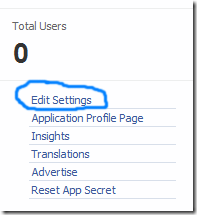
      6.  One the new window that appears click the Edit Settings link ,
edit-settings
        7.  Then go to Website option and write your Site Domain as blogspot
website
       8.  Save Changes and jump to the next step of this tutorial

2- Adding the Facebook comments Box to Blogger

Now mbed the comments box in your blog templates. So follow these easy steps,
PS: Please make sure your blogger comment form is embedded below posts. For doing this first go to Blogger > Settings > comments > and then choose embed comments below posts. After doing this follow the tutorial below.
  1. Go To Blogger > Design > Edit HTML
  2. Backup your template
  3. Check the "Expand Widget Templates" box
  4. Search for <html and just after it give a space and add this code,
xmlns:fb='http://www.facebook.com/2008/fbml'
  5.  Next search for 
<body>
Note: In New Blogger Designed templates the same code looks like this,
<body expr:class='&quot;loading&quot; + data:blog.mobileClass'>
Find any one of these codes and just after it paste the code given below,
<div id='fb-root'/>
<script>
    window.fbAsyncInit = function() {
    FB.init({
      appId  : &#39;YOUR_APP_ID&#39;,
      status : true, // check login status
        cookie : true, // enable cookies to allow the server to access the   session
      xfbml  : true  // parse XFBML
    });
  };
    (function() {
    var e = document.createElement(&#39;script&#39;);
      e.src = document.location.protocol +   &#39;//connect.facebook.net/en_US/all.js&#39;;
    e.async = true;
      document.getElementById(&#39;fb-root&#39;).appendChild(e);
    }());
</script>


  • Replace YOUR_APP_ID with your Facebook application ID that you saved in a notepad.
    6.    Next search for  </head> and just above it paste the following code,
<meta expr:content='data:blog.pageTitle' property='og:title'/>
<meta expr:content='data:blog.url' property='og:url'/>
<meta content='
MYTricksBlogger' property='og:site_name'/>
<meta content='
BLOG-LOGO-IMAGE-LINK' property='og:image'/>
<meta content='
YOUR_APP_ID ' property='fb:app_id'/>
<meta content='http://www.facebook.com/mybloggertricks' property='fb:admins'/>
<meta content='article' property='og:type'/>

Now Make these changes:
  • Replace MYTricksBlogger with your blog title/Name.
  • Replace BLOG-LOGO-IMAGE-LINK with the image link of your logo. Your logo will look good if it is in gif format and having this size ->  40px by 40px . This logo will appear next to your post title on Facebook profiles of your visitors like this,
logo
  • Replace YOUR_APP_ID  with the your Facebook Application ID that you saved in notepad
  • Replace http://www.facebook.com/mytricksblogger with your Facebook user profile link
    7.    Now Search for this,
<b:includable id='comment-form' var='post'>
    8.    Just after it paste the code given below,
<b:if cond='data:blog.pageType == &quot;item&quot;'>
<div style='padding:0px 0px 0px 0px; margin:0px 0px 0px 0px;'><script src='http://connect.facebook.net/en_US/all.js#xfbml=1'/>
<div> <fb:comments  colorscheme='light' expr:href='data:post.url' expr:title='data:post.title' expr:xid='data:post.id' width='520'/></div>
<div style='color:#fff; background-color:#3B5998;border: solid 1px #ddd; font-size:10px; padding:3px; width:510px;'>Facebook Blogger Plugin: Bloggerized by <b><a alt='blogger templates' href='http://www.allblogtools.com/' style='text-decoration:underline; color:#fff;' target='_blank' title='blogger templates'>AllBlogTools.com</a></b> Enhanced by <b><a alt='blogger widgets' href='http://www.mybloggertricks.com/' style='text-decoration:underline; color:#fff;' target='_blank' title='Blogger Widgets'>MyBloggerTricks.com</a></b></div></div>
</b:if>
  • If you want to use the dark scheme then simply replace light with dark
  • To change the Comments box size, change this value width='520'
  • To change the footer credits size, change this value width:510px
  • Keep a difference of 10 pixels between the box size and footer size. For example if you set box-size to width='600' then set footer-size to width:590px

      9. Save your template and you are Done!
Enhanced by Zemanta

Removing Navbar From Blogger

English: Brain Blogger logo
English: Brain Blogger logo (Photo credit: Wikipedia)
The Blogger Navbar is use for example:

People can search for any post using blogger navbar in your blog, people can share your blog and can randomly go to the the next blog.

There are many who wants to hide blogger navbar from their blogs because navbar dont look that good.

Blogger has added lots of new features this year there is a feature that help the removal of navbar  fast and easy way. Now you can remove navbar from blogger, just follow the simple steps.
  • Sign in to blogger.
  • Go to layout.
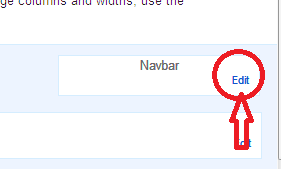
  • Click on edit on the navbar.
removing navbar from blogger
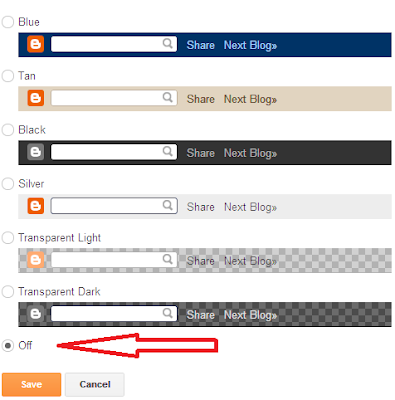
  • Now a popup will open and you will see the options to change the color of navbar but in the end you will see a new option that blogger has added is to turn it off.  Click on it and and click Save.
remove navbar from blogger
tricks Enjoy!
Enhanced by Zemanta

Botones Isometricos de Social Media


Barra Lateral Fija