Welcome Enjoy Tutorials

Liked us?

Showing posts with label Youtube. Show all posts

Tuesday, April 30, 2013

Google Currents can take your blog to iPhone, iPad and Android


This is an issue I've been mulling over a few months How to get blog posts are displayed optimally using a native application on iPhone, iPad, Android Smartphone and Tablets with Android?

What is Google Currents?
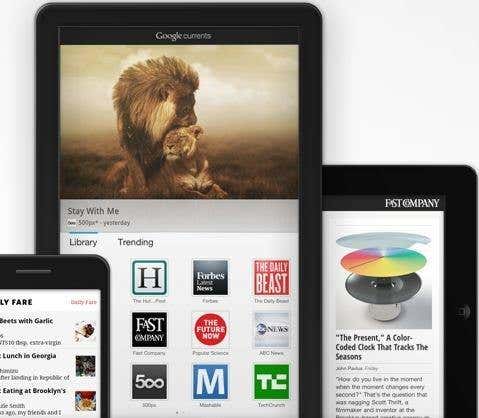
Google Currents is an application to be installed in any of the above mentioned devices from Android Market or from the Appstore as applicable.

Google Currents can subscribe to Publications. These editions are created using Google Currents Producer and this is where it gets really interesting as you can take advantage of RSS (Feed) of the blog as a source to create a new edition. But not only that, they also create other sections within your linked Edition Flickr, Picasa, YouTube, Google+ and all the RSS feeds you want.

We're actually doing a magazine or trade publication compatible with iPhone, iPad, Android and tablet all from a single service called Google Currents. I have found what I've been looking for so long, finally a service (from Google no more and no less) which ensures the correct display of the articles in my blog on these devices.

Google Currents is more than an RSS reader and the source is a repeat edition which in turn is composed of different sections (rss, photos, videos, articles, etc.).

You should see the following video of just over 1 minute to see how Google Currents. Each icon on the home screen are Editions.


After mastering this new service, we set to work to create our own from the Blog Edition.

How to create a Google Currents edition with the contents of the blog?

     1.Connect with Google Currents Producer (only from the Google Chrome browser)
     2.Accept the terms of use, you must fill out a short form
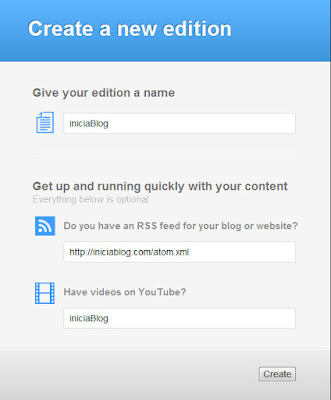
     3.The next step is to create a new edition using a form which asks:google currents
         Edition name
         RSS Feed
         (http://tublog.blogspot.com/atom.xml)
         Optionally Youtube channel
     4. Click the Create button to start the process of creating your new edition. You see this is a quick start wizard where it asks for two basic elements, the feed and a YouTube channel, you add more after more sections to your edition
    5. Once completed, the entire interface to access Google Currents Producer of where you should go reviewing and completing the information on the different tabs.
Interface Google Currents
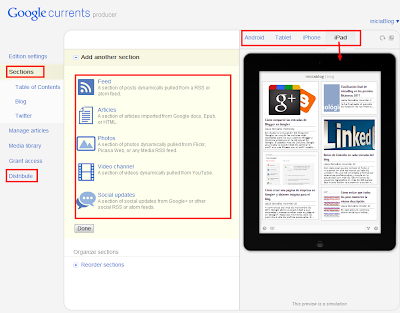
I have highlighted in Red are those keys though of course you must go through each of them. Once you have your sections and you have it ready, the next step is the distribution. Which is to offer to the readers of your blog a link to subscribe to your issue from your device.
google currents
IniciaBlog editing Editing for iPad, iPhone and Android devices using Google Currents Producer
Obviously the first thing you should try is yourself, remember that requires that you have previously installed the Google Currents.

As you can see is a very good service that solves a complex issue. Followers of the blog will have a compatible editing on these devices also leveraging the power of each one of them.

From the Distribute tab you can get the link then you will promote to your readers.

Enhanced by Zemanta

Analysis and advice On Blogger Comments on Google+

English: Google+ wordmark
English: Google+ wordmark (Photo credit: Wikipedia)
 In this publication we will make an analysis of this change, the impact of which is from the point of view of the administration of the blog, for the impact it has for readers and also the scope of this novelty.


Blogger and Google+, Google+ and Blogger does not matter the order, the fact is that Google+ is Google's bid to compete to enter fully into the world of social networks and where they go most of new company developments . Sooner or later different service and products are integrated with Google+ iran.

Blogger is because it represents one of the most Google services integration with new social network has experienced in the last year, but not the only, the search engine, Gmail, YouTube, Google Analytics, webmaster tools , etc, etc.., have been in some way or another affected in favor of greater integration with Google+.
Enhanced by Zemanta

Monday, April 1, 2013

What is IFTTT and how to combine it with Blogger

ifttt tasks
ifttt tasks (Photo credit: sekimura)
IFTTT is one of those tools that once you know hooked. Learning to combine it with Blogger, facilitate the work of disseminating your post to social networks.

IFTTT The name is derived from the phrase "If This Then That" which translated means something like ... "If this happens then do this instead." For example, if I publish a new post in Blogger, then Twittéalo.

 Once you set up an action you've managed to create a Recipe or Recipe. You can create as many recipes as you like combining ingredients like Blogger, Twitter, Facebook, Linkedin, Wordpress, Flickr, Instagram, RSS, Buffer, Youtube, Date and Time, Time, Gmail, SMS, Evernote and so up to 51 different channels. Imagine the possibilities. A recipe consists of a maximum of 2 ingredients. As you go using new channels, the creation wizard will ask you to activate.


What is the goal we seek with IFTTT?
The aim is to make the information flow between the different services and social networks that supports IFTTT. I mean, the hardest part is done, you got drafted, revised layout and a new article to your blog. Once you publish should be launched all the machinery of diffusion into social channels you have.

With this tool you should save time spreading your publications, therefore have more time for you, so you have no excuse not to play sports: D

Sicronizar Blogger with Twitter, Facebook and Linkedin.
What use TwitterFeed or IFTTT?

We learned to synchronize the blog with Facebook, Twitter and Linkedin using TwitterFeed. However with IFTTT have more control over the final content to publish, possibility to combine with other services and attending other events. As you can see from the list can be complementary, although I personally have disabled TwitterFeed to focus on this other tool and get the juice.

10 recipes IFTTT applied to Blogger
Let's see what you can do using this service as one of the ingredients Blogger:

    If I publish a new post Blogger then publish it on Twitter / Facebook / Linkedin (3 recipes)
    If I publish a new post Blogger then make a copy in Dropbox / Google Drive (2 recipes)
    If I publish a new post in Blogger Tumbrl then publish it also in / WordPress (2 recipes)
    If a friend published a new blog post (using the ingredient Feed) Launches entoces my followers Tweet your news
    If I publish a new post in Blogger then send an email / SMS / telephones a person (3 recipes)
    If a video frame as a favorite on YouTube then published a post on Blogger
    If a photo frame as favorite Flickr / Instagram then publish a post on Blogger (2 recipes)
    If I ckecking with photo on FourSquare then publish a post on Blogger
    If you checked items in Google Reader favorites publishes a new post in Blogger
    If I receive an email (GMail) with certain subject published a new post in Blogger

Other recipes very curious IFTTT


    Using the service date and time, you could create one recipe that a good night to your followers on Twitter, but you bring a couple of hours sleep.
    Using Time ingredient, you could receive an email if tomorrow forecast is for rain.
    Belkin Finally a company has developed a power switch and a motion detector for home that is integrated as one of the 51 ingredients and can for example, create a recipe to turn on a light in your home or receive a email reminding you that you have to clean the cat litter box every time this visitor.

How to create a new recipe
The process is very simple. The first thing to do is register on IFTTT and once inside you can browse the recipes shared by other users.


IFTTT Did you know? Do you're using? What is your favorite recipe?

Enhanced by Zemanta

Sunday, March 31, 2013

What to choose for your blog platform Blogger or Wordpress?


English: WordPress Logo
English: WordPress Logo (Photo credit: Wikipedia)
Maybe you've got here just looking at Google. This should make you think about the potential of a blog is that now, more than ever, the contents play a very important note that is what will differentiate you from the competition.

As you probably know, there are basically two important and recommended platforms for your blog,  Wordpress and Google's Blogger.This is a blog created with the Blogger platform. I do not intend to make a comparison with Wordpress but Blogger expose the benefits of that is the tool I use. To complete your study try to put links to recommended reading comparisons between the two platforms.

Then answer the questions you have in your head :-)
This is icon for social networking website. Th...
This is icon for social networking website. This is part of Open Icon Library's webpage icon package. (Photo credit: Wikipedia)


Why do I need a blog?

    To have your own space from which to communicate on the Internet


What topics I can write on the blog?

    Personal issues, experiences, travel ...
    Corporate, product news, offers ...
    Specialized topics, programming, design, cooking ...


What is the attitude I should have?

    Be consistent in the literature
    Transmit a direct and clear
    To think that each publication should be better than all previous
    Being supportive and think that convey your knowledge can help others if anything in return
    Involved with the comments and followers of your blog


Can you make money with a blog?

    If you open a blog with ideas to make money better than not even try
    You can make money with a blog, but very long term (2-3 years)
    Money should not be the trigger that drives you to create a blog


What are the best platforms for hosting a blog?

    Blogger
    Wordpress


What does it cost to create and maintain a blog?

    The blogging Blogger is free both as in the online version of Wordpress ("In some cases we can announce Google text ads on your blog, but only very rarely" features extracted from Wordpress)
    WordPress is an installable version which is what most people use. To run this version you must have a hosting service where host and your blog thereby incur an extra expense.
    Many hosting providers make it easy WordPress installation but better have a friend with knowledge about you. In certain situations this "friend" can mean an additional cost (calls, emails, weather, etc).
    Wordpress Security Updates. If you go for the installable version of Wordpress keep in mind that you must keep your updated version and this maintenance can also add costs.
    Blogger does not have an installed version, the service is hosted on Google's servers and not have to worry about the hosting and maintenance, always use the latest version of the product


What do you expect from this blog platform?


    Make it easier to post
    Make it easy to manage
    That service constantly improve and evolve
    Which is stable


The ten reasons why I recommend Blogger

    Because it requires having to install or download anything. Everything from the browser
    Because it requires no technical knowledge of html, css, javascript. This causes you to focus exclusively on publications
    Because behind Google's Blogger
    Because the hosting is free to both the domain. Blogspot.com as the custom domain.
    Because after the blog integrated other Google services like Google Analytics (Statistics), Google Adesense (advertising), Google Site (site creator and file storage space for the blog), Google Webmaster Tools (which allows the search index Also of Google), Google Picasa to store photos blog, Youtube for videos ...
    Because you can also post on the blog from a smartphone
    It incorporates a powerful template designer in addition to the thousands you can get for free
    Because you can get started without spending a single euro thanks to the free domain. Blogspot.com
    Because you can buy a domain at any time directly (12 dollars / year) and free domain redirect you to the new.
    Because there is a large community of users who use it


Have you looked at Blogger lately?
 
What do you need to create a blog?

     For an account of GMail Blogger
     Wordpress For Online any email account

At this point you should have clarified certain doubts, now you decide which platform is Blogger or WordPress (online version or downloadable version), it is clear that my experience is very positive and Blogger is my recommendation.

Now what?

     Start by making a tour through Blogger and decides at the last step if you are creating the blog
     Lee Wordpress features and decide at the end if you are creating the blog


Enhanced by Zemanta

Botones Isometricos de Social Media


Barra Lateral Fija